


A mod is a plugin that adds to Claude Code's own interface. The plugin's name is prompt-wand, and its main button reads 🪄 Sharpen prompt. claude plugin list shows the version you have, and CHANGELOG.md lists what changed in each version.
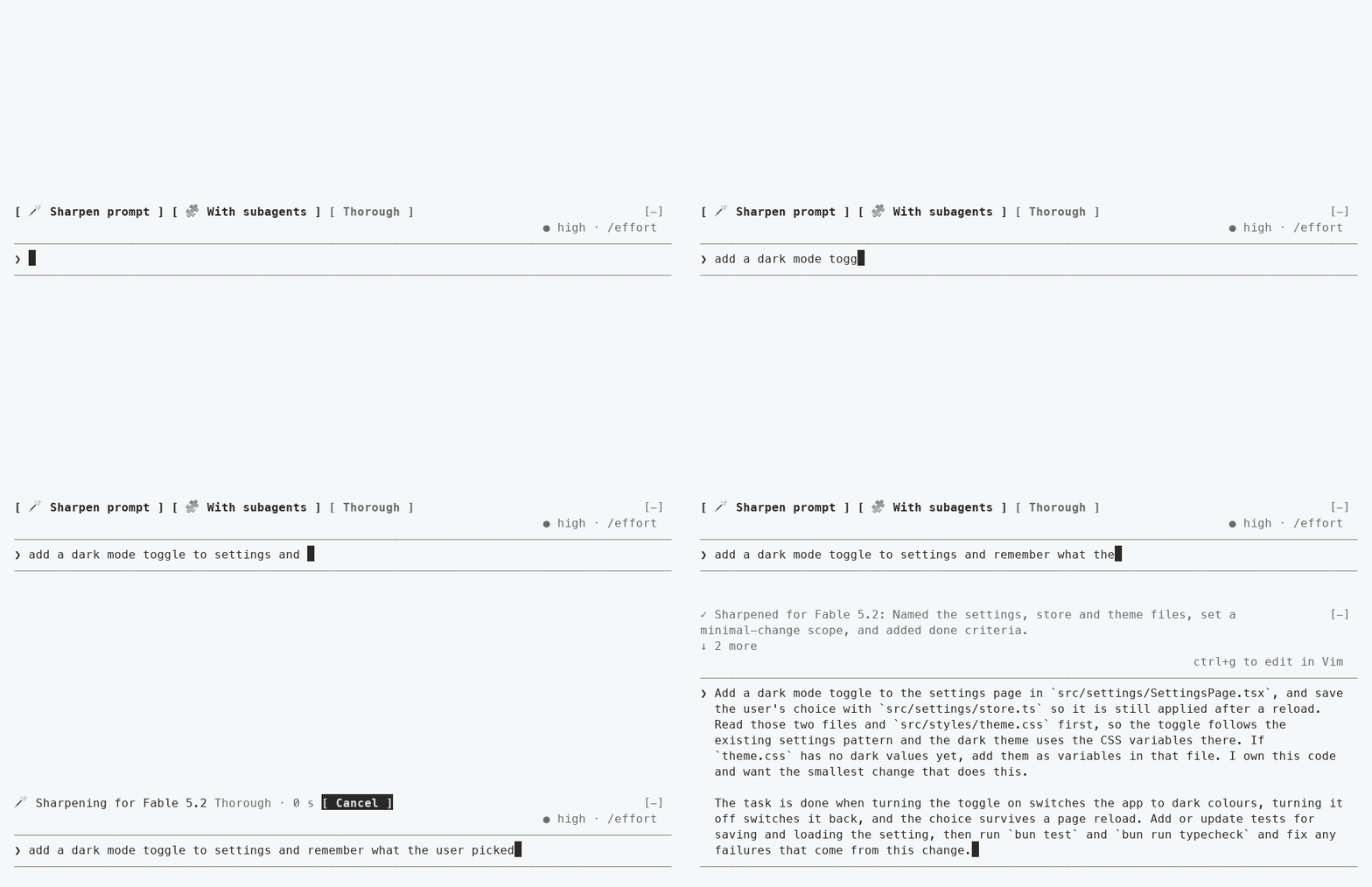
Type what you want the way you think it, for example "add a dark mode toggle to settings and remember what the user picked". Press 🪄 Sharpen prompt in the band above the prompt box, or type /sharpen before the draft. A second model rewrites the draft for the model you have selected. Where the draft needs it, the rewrite names the files that matter, says what done means and adds the check that proves the change. A draft that is already clear changes little. You read the result, edit it if you like, and send it as your own message.
What it does
| Button | What you get |
|---|---|
| 🪄 Sharpen prompt | Your draft rewritten as a clear prompt for the selected model. |
| 🧩 With subagents | The same rewrite, plus a plan that splits the work across the subagents your session has. |
| 🔥 Grill me | The rewrite, then questions in a dialog, round after round, until the request is clear. Your answers go into the prompt. |
All three buttons:
- keep everything you wrote: paths, names, numbers, code and quoted text
- add nothing you did not ask for, and tell the model how to find out what is missing, or to ask you
- read your project's
CLAUDE.md,.claude/CLAUDE.mdandAGENTS.md, its file names two levels deep and its manifest (package.jsonscripts,Makefiletargets and the like), so the prompt can name real files and the real check command - read the last few messages of the session, so a draft such as "fix that" or "it still fails" becomes a prompt that names the thing
- cope with dictated and second-language drafts: filler is dropped, and a misheard word such as "cash" is read as the term or project name you meant
- shape the prompt for the kind of request: a bug gets what happens, what should happen and the error; a question says that no files change
- list up to three questions that only you can answer, and check in plain code that no path, link, number or quoted text from your draft was lost. See Questions and the detail check.
- follow the prompting notes for the target model family: Opus, Sonnet, Haiku or Fable
- never send anything for you: the rewrite goes into the prompt box, Undo brings your draft back and Redo puts the rewrite back
- point out technical words in your draft that were wrong, loose or ambiguous, and give the precise term for each. See Terminology notes.
Why
Agents do better work from a clear request, but writing one takes time, so most of us type a short line and hope. Prompt Wand does the slow part and leaves you the final say.
Requirements
- Claude Code with mod support. Version 0.4.0 was built and checked against Claude Code 2.1.330. An older build may lack parts it uses, such as the button keys or the
/sharpencommand. - The band above the prompt box is drawn in the Claude Code terminal and the Claude desktop app. It is not drawn in the VS Code extension.
- Each press makes three or four small model calls on your Claude account, so the prompt is in the box within about 10 seconds. 🧩 With subagents makes four to six, and a 🔥 Grill me session makes two to four more for each round of answers. See What it sends, and the cost.
Install
At the prompt of a Claude Code terminal session:
/plugin install prompt-wand --marketplace CodeWithBehnam/prompt-wand
Answer y to add the marketplace, then pick the user scope so the mod loads in every session.
From a shell:
claude plugin install prompt-wand --marketplace CodeWithBehnam/prompt-wandIn the Claude desktop app: click + next to the prompt box, then Plugins, Add marketplace with CodeWithBehnam/prompt-wand, then Add plugin.
Update or remove
claude plugin update prompt-wand@prompt-wandRestart Claude Code after an update.
claude plugin uninstall prompt-wand@prompt-wandUse
- Type a draft in the prompt box. The band above the box shows 🪄 Sharpen prompt, 🧩 With subagents, 🔥 Grill me and the mode. It hides while the box is empty or holds a slash command or a shell line.
- Press a button: click it, or press
Ctrl+XthenTabto focus the band and then the button's key (see Keys). The arrow keys andEnterwork too. - While the rewrite runs, your draft shimmers in moving rainbow colours, and the band shows the target model, the mode and the seconds passed. Cancel stops it. Sending a prompt also stops it. The Shimmer setting switches the colours off.
- What happens next:
| Result | What you see |
|---|---|
| A rewrite of 15 lines or fewer | It replaces your draft. The band says what changed, with Undo (until you send), Again, Done and a field for a second go. See Undo, Redo and Done and Again, with an answer. |
| A longer rewrite, one that arrives after you edited the draft, or one the box could not take (a dialog was open, say) | It waits in a Rewritten prompt pane. Check it, then press Replace draft, Copy or Discard. Show opens the pane again. |
| A failed call (an API error, an empty reply, a reply with no prompt in it) | The band says why, with Retry and Dismiss. Your draft is unchanged. |
| A draft or settings problem | The band says what to fix, with Dismiss. No call is made. |
After a rewrite the band also shows what the press used, for example 3 calls, 4.1k tokens. See What it sends, and the cost.
After the first rewrite, the three buttons shrink to their icons for the rest of the session.
The /sharpen command
Type /sharpen and then your draft, and press Enter:
/sharpen add a dark mode toggle to settings and remember what the user picked
The mod rewrites the text after the command, in the mode you have chosen, and puts the rewrite in the prompt box with Undo, as the 🪄 button does. If you type in the box while it runs, the rewrite waits in the Rewritten prompt pane. The command does the plain rewrite only: use the buttons for subagents or a grill session. Like any command, the line you typed stays in the session's transcript.
Undo, Redo and Done
- Undo puts your draft back. The band then shows the buttons again, with Redo.
- Redo puts the rewrite back, with any edits you made to it before you pressed Undo. Typing after Undo ends Redo.
- Done clears the result from the band and leaves the prompt box as it is, so the buttons are back for your next draft. Emptying the box does the same.
Sending the prompt ends all of it: a sent draft cannot be brought back.
Keys
The keys work while the band holds the focus: press Ctrl+X then Tab, or click the band. They do nothing while you type in the prompt box.
| The band shows | Keys |
|---|---|
| The buttons | s Sharpen prompt, w With subagents, g Grill me, m Quick or Thorough |
| A rewrite running | c Cancel |
| A rewrite in the box | u Undo, a Again, q Answer, n questions and notes, t Use thorough, d Done |
| A rewrite waiting in the pane | r Replace draft, v Show, n questions and notes, t Use thorough, c Copy, x Discard |
| The buttons after Undo | r Redo, and the buttons' own keys |
| A failure | r Retry, x Dismiss |
🧩 With subagents
This button rewrites the draft the same way and also splits the job across subagents. The prompt gets a <subagent_plan> section: each subagent's type, its task, what it returns and, where the mod chooses them, its model and effort. The plan also says which parts run at the same time and how the main session combines and checks the results.
- It names only subagents your session has. Once the session has listed its agents, it uses that list: built-in, project, user and plugin agents. Before the first turn of a session it reads the agent files in the project's
.claude/agentsand in~/.claude/agents(or$CLAUDE_CONFIG_DIR/agentswhen that is set), plus the built-ingeneral-purpose. Plugin agents can be missing until then. - An agent whose file in one of those folders sets a model keeps it, and the plan names no model for it. The mod cannot see the model of built-in or plugin agents, so it treats them as having none.
- Every other subagent gets the Subagent model at the Subagent effort from the settings:
opusat medium effort unless you change them. The plan picks another model only where a part clearly suits it, and says why: Haiku for a plain search, Fable for the hardest reasoning. - Where the project's instructions say subagents only report, the plan keeps the edits in the main session.
- If the request is too small to split, the plan says so and uses one subagent.
Questions and the detail check
The rewriter may not guess. Where your draft leaves out something that only you know, such as the behaviour you expect or which environment you mean, it lists up to three questions. They show in the Questions and notes pane, the most important first. The prompt does not wait for them: for each open point it still tells the model to find out or to ask. The questions are a model call of their own, made by the quick model, so they can join the rewrite a moment after it is in the box. A draft that says enough gets no questions.
After each rewrite the mod also compares your draft with the rewrite in plain code, with no model call. The band warns with ⚠ when:
- a file path, link, number,
@mention or quoted text from your draft is not in the rewrite. This includes a name the rewriter corrected, so you can see that it changed. - the rewrite names a file that is in neither your draft nor anything else the rewriter was shown, so it may not exist.
The check looks for each detail as a whole value: 30 does not count as kept because the rewrite says 300, nor app.ts because it says app.tsx. It reads words, not meaning, so it can miss a detail or warn about a harmless change. It never blocks the rewrite.
🔥 Grill me
Press 🔥 Grill me when the request is still vague in your own head. The mod asks you what the draft leaves open, in Claude Code's own question dialog, and writes the prompt in the background while you answer:
- one question at a time, with two to four suggested answers, the recommended one first. You can also type your own answer.
- after each round of up to four questions, the rewriter gets your first draft with all your answers and writes the prompt again. If your answers open new points, it asks about those next.
- the session ends when nothing that matters is left open, after four rounds, or when you dismiss a dialog. Leave a question empty to skip it.
The prompt written from your answers so far then goes into the prompt box as usual, with Undo. If questions are left, they stay in the Questions and notes pane.
After an ordinary 🪄 or 🧩 rewrite that has questions, the band shows 🔥 Answer. It starts the same session from those questions, with no model call before your first answer.
The rewriter asks only what you alone can answer. What the model can find in the project or the conversation, it does not ask.
Again, with an answer
Again rewrites your first draft a second time, not the rewrite that replaced it, so the prompt does not drift from your own words. The field next to it takes a short line: an answer to one of the questions, or what to change ("shorter", "staging only"). Press Enter and the rewriter gets your first draft and that line together. Answers you gave earlier, in the field or in a grill session, are sent again with it, so nothing you said is lost. Undo still brings your first draft back.
If you edited the rewrite in the prompt box before the second go, your edits are kept: the new rewrite waits in the Rewritten prompt pane. If the second go fails or you cancel it, the first rewrite stays as it was.
Terminology notes
A loose technical word can send the model the wrong way: "the database" when you mean one table, or "compile" when you mean run a script. With each rewrite, the mod also has the technical words in your draft checked. Where one was wrong, loose or ambiguous, the Questions and notes pane opens beside the rewrite. Each note gives:
- the phrase you wrote and the precise term to use instead
- one short reason, and one example sentence that uses the term
- for a phrase with two meanings: what the model probably understood, and what you probably meant
There are at most three notes, the one that matters most first. Grammar, spelling, typos and dictation slips with a clear meaning get no note, and a draft with clear wording gets no pane at all. The notes are written in the language of your draft.
The pane never takes the keyboard, so you can edit and send the prompt while it is open. Dismiss closes it, and the 📖 button in the band, which counts the questions and notes, opens it again until you send. When a rewrite waits in the Rewritten prompt pane, press 📖 to see them. They do not change the rewrite: for a phrase with two meanings the prompt still tells the model to find out or to ask, and the note helps you fix the wording yourself.
The notes come from a model call of their own, made by the quick model at low effort at the same moment as the rewrite. They can join the rewrite a moment after it is in the box, and they are left out if they take more than 8 seconds. Switch them off with the Terminology notes setting.
Quick or Thorough
The button next to the others shows both modes and switches between them. The selected mode is a solid block of its own colour with its icon, amber ⚡ Quick or purple 🔬 Thorough, and the other one is dim. On a narrow terminal the other one shows only its initial. Thorough, the default, uses the thorough model (sonnet at medium effort unless you change it). Quick uses the quick model (haiku at low effort), a lighter choice for short drafts. Your choice is remembered across sessions.
No press hangs on one model call, since a call now and then stalls for a minute or more:
- A call for the prompt that has not answered after 3 seconds gets a second call beside it.
- In Thorough mode the second call goes to the quick model. For the first 8 seconds only the thorough model's prompt is used. After that the first finished prompt is used, and a message tells you when it is the quick model's. The Thorough wait setting changes the 8 seconds.
- When the quick model's prompt was used because the thorough one was slow, the thorough call runs on. When its rewrite arrives, the band shows Use thorough. Nothing changes in the prompt box until you press it.
- When the thorough model fails, for example because the setting names a model your account cannot use, the message names the model and the reason, so you can fix the setting.
- In Quick mode, and in Thorough mode when both settings name the same model, the second call repeats the same request and the first whole reply is used.
Settings
Open /config in Claude Code and choose the Prompt Wand plugin's options. From a shell, claude plugin configure prompt-wand@prompt-wand shows them. A change takes effect at once.
| Setting | Default | Takes |
|---|---|---|
| Thorough model | sonnet |
A model alias or a full model ID |
| Thorough effort | medium |
low, medium, high, xhigh or max |
| Thorough wait (seconds) | 8 |
8, 15, 30 or 60: how long a press waits for the thorough model before it uses the quick model's rewrite |
| Quick model | haiku |
A model alias or a full model ID. It also writes the questions and the terminology notes. |
| Quick effort | low |
low, medium, high, xhigh or max |
| Subagent model | opus |
What a subagent plan gives a subagent whose own file sets no model |
| Subagent effort | medium |
low, medium, high, xhigh or max |
| Prompt format | xml |
xml for XML tags, markdown for headings, plain for plain paragraphs |
| Extra rules | empty | Your own standing rules for every rewrite, such as "Always write in British English". Up to 2,000 characters. |
| Terminology notes | on | On or off. Off, no notes are asked for or shown. |
| Recent conversation | on | On or off. Off, the rewriter sees no messages of the session. |
| Shimmer | on | On or off. Off, the draft keeps its own colours while a rewrite runs. |
The model defaults are aliases, so they follow the newest model of each family without an update of the mod. If your provider does not take an alias, set the full model ID.
What it sends, and the cost
Nothing is sent until you press a button or run /sharpen. Each press then makes several model calls on your Claude account, started at the same moment, so that the prompt arrives fast:
| Press | Calls |
|---|---|
🪄 Sharpen prompt or /sharpen |
3 or 4: the prompt, the questions and the terminology notes, and a second call for the prompt if the first has not answered after 3 seconds |
| 🧩 With subagents | 4 to 6: the same, plus the subagent plan, and a second call for the plan if it is slow too |
| 🔥 Grill me | 3 to 5 to start: the prompt, the questions, the notes, and a second call for the prompt or the questions when one is slow. Then 2 to 4 for each round of answers, four rounds at most |
| Again | 2 or 3: the prompt, the questions, and a second call for a slow prompt. The notes are kept from the first rewrite, or asked for again (one more call) if it got none. |
The questions and the notes go to the quick model, in both modes. A call whose reply is no longer needed is stopped. The exception is the thorough model's call after the quick model's rewrite was used: it runs on, for up to five minutes, so that Use thorough can offer its rewrite, and it uses tokens whether or not you take it. With Terminology notes off, each press makes one call fewer.
After a rewrite the band shows the calls made and the tokens they read and wrote, cached ones included, for example 3 calls, 4.1k tokens. Read it as a guide, not as a bill. The part of each call that holds your project's context is marked for the provider's prompt cache, so the calls that follow can cost less where the provider applies it.
Each call carries:
- your draft, up to 40,000 characters
- the
CLAUDE.md,.claude/CLAUDE.mdandAGENTS.mdfiles from the session's folder up to the top of its repository, cut to 24,000 characters in all. The top is the nearest folder with a.gitentry, so a session started in one package of a monorepo also sends the repository's own instruction files. Without a repository, only the session's folder counts. - the session folder's full path, the names of the first 150 files and folders at its top level, and up to 300 names one level down (
.git,node_modules,.venv,__pycache__and.DS_Storeare left out) - from the manifests at the session folder's top level: the package manager and the scripts in
package.json(not its dependencies), the target names inMakefileandjustfile, and the first 3,000 characters ofpyproject.toml,Cargo.toml,go.modanddeno.json - while Recent conversation is on: the text of the last 8 messages that you and the model wrote in the session, each cut to 1,500 characters. Tool calls and their results are not sent, and neither are shell lines you ran with
!, slash commands or what they printed. - on a second go or in a grill session: the questions you answered with your answers, and the lines you typed in the band's field, up to 6,000 characters in all
- your Extra rules setting, when it is not empty
- the name of the target model and today's date
Instruction files above the repository, and anything in your Claude configuration folder such as your personal ~/.claude/CLAUDE.md, are not sent. 🧩 With subagents also sends, for up to 40 subagents your session can use, the name, where it is defined, its model and the first 300 characters of its description, including the ones in your ~/.claude/agents, but not their instructions.
Every call of a press carries the same things, so the questions and the terminology notes send nothing that the prompt's call does not. Only the calls for the subagent plan carry the subagent list. The detail check runs on your computer.
A call for the prompt or the plan times out after five minutes, a call for the questions or the notes after 8 seconds, and a call for a grill session's questions after 30 seconds. The mod makes no other network calls and runs no commands. The only file it writes is its own small store in Claude Code's configuration folder, which keeps your Quick or Thorough choice. The full privacy policy is in PRIVACY.md.
Known limits
- In the Claude desktop app, the band appears after the first message of a new chat. The app starts the session only when you send, so there is nothing to draw the band before that. In the terminal it shows at once.
- Slash commands and shell lines (a draft that starts with
!) are not rewritten: they only work as typed. The mod asks the session which commands it has, so a draft that only looks like one, such as/users returns 500or a path such as/Users/me/app, is rewritten as usual. A single/wordwith nothing after it counts as a command you are still typing. - A draft over 40,000 characters is refused.
- The band learns about the draft from your typing. If you bring back an earlier prompt into an empty box, with the up arrow for example, the band appears once you type.
- One rewrite runs at a time.
/sharpensays so if you run it while another rewrite is running. - The rewriter has notes for the Opus, Sonnet, Haiku and Fable families. For any other model it uses the general rules only.
- Agent files are read only from the top level of each agents folder, not from subfolders.
- The rewriter writes in the language and spelling of your draft, unless your Extra rules say otherwise. It does not run your request or edit files.
Troubleshooting
| The band or a message says | What to do |
|---|---|
Set "Thorough model" in the Prompt Wand settings (run /config). (or Quick, or an effort) |
Fill in that setting. Efforts take low, medium, high, xhigh or max. |
The thorough model (…) gave no rewrite: … |
The rewrite you got is the quick model's. Check that Thorough model names a model your account can use. |
This rewrite is from the quick model: the thorough one needed more than 8 seconds. |
Nothing is wrong. Wait for Use thorough, or raise the Thorough wait setting. |
The draft is over 40,000 characters. |
Shorten the draft. |
the API answered … (HTTP …) |
The model call failed. Check that your account can use the model in the settings, then press Retry. |
the model did not answer within … seconds |
The call ran out of time. Press Retry. |
its reply held no prompt in the expected tags |
The rewriter's reply was cut off or malformed, which a very long draft can cause. Press Retry, or shorten the draft. |
the rewriter sent back no text or the call was cut off before it finished |
Press Retry. |
For anything else, start Claude Code with claude --debug, repeat the steps and look for the lines that mention prompt-wand.
Development
CONTRIBUTING.md shows how to run the mod from a clone, how to check a change (claude plugin validate, claude plugin test and tsc), which hooks the mod uses and what each file does.
Licence
MIT. See LICENSE.
Contributing
Want to contribute or run it locally? See CONTRIBUTING.md. Everyone who takes part follows the code of conduct.
Bug reports and ideas are welcome through the issue forms. For a security problem, follow SECURITY.md and do not open a public issue.
Thanks to everyone who has contributed:
Star history
The chart shows the repository's GitHub stars over time, from star-history.com. It updates by itself. Click it to open the full chart.